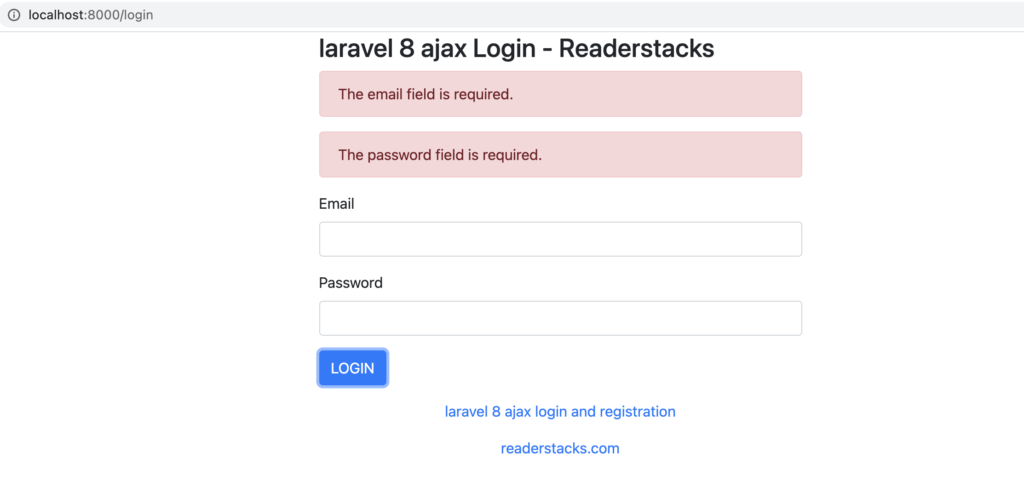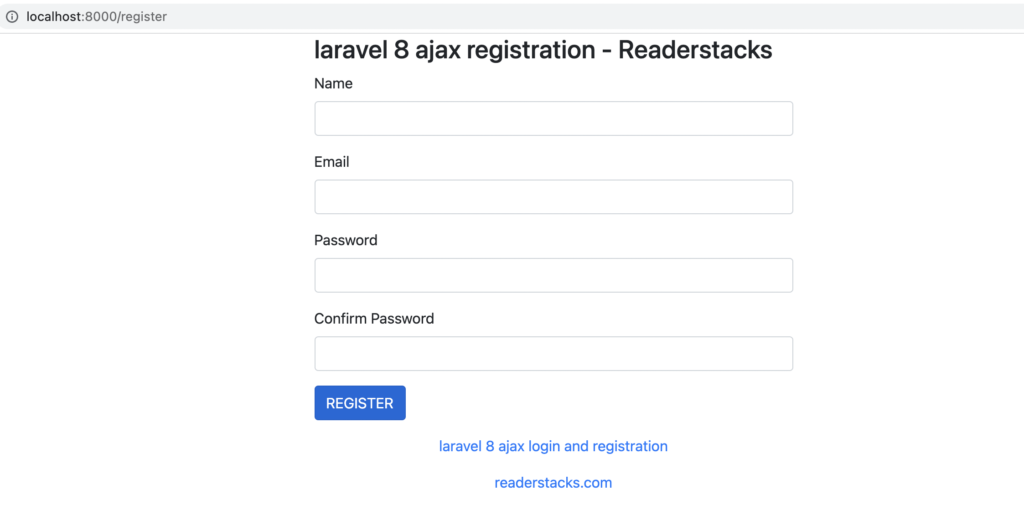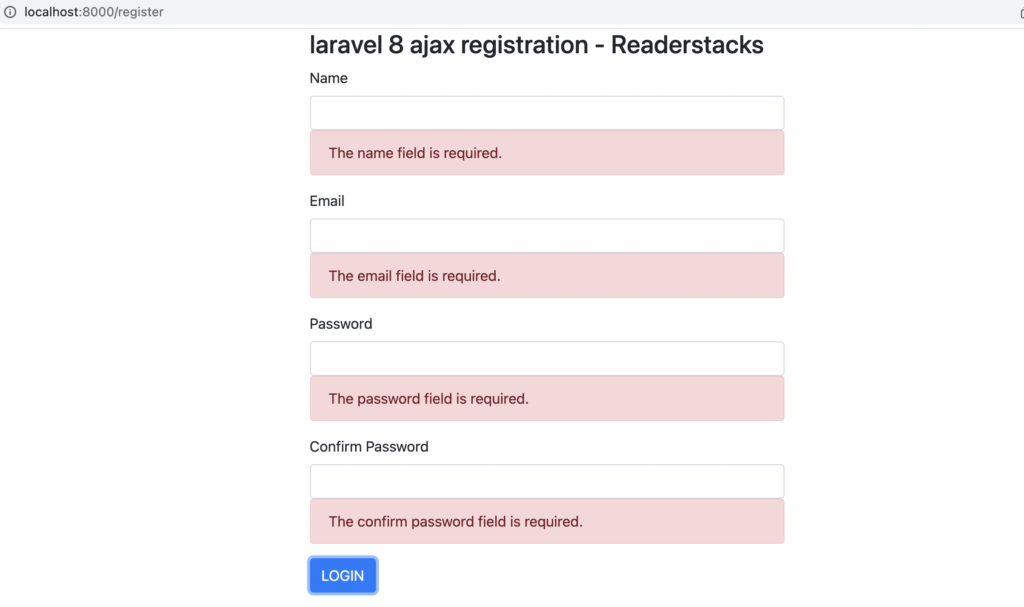
In Laravel 8 there is multiple ways to implement the laravel Ajax login and registration like Laravel provides its own auth with packages Jetstream, passport,sanctum, breeze and fortify. These all packages are easy to install and configure but sometimes our application requirement and design patterns are different or we can say we want fully customized solution. Therefore we have already covered simple login and registration in out last article and today i am going to share login and registration using Ajax.
For this tutorial we will use jQuery for Ajax request and form validation. Bootstrap for better ui experience.
Step to Laravel ajax login and registration with example
Let’s begin the tutorial of custom login and registration step by step
Step 1: Create a laravel project
First step is to create the Laravel 8 project using composer command or you can also read the How to install laravel 8 ? and Laravel artisan command to generate controllers, Model, Components and Migrations
composer create-project laravel/laravel example-appStep 2: Configure database and table
Next step is to configure the database for our project, table and data. I assuming you have created the database using MySQL command line or phpMyAdmin then open .env or if file not exist then rename .env.example file to .env file in root folder and change database details accordingly.
DB_CONNECTION=mysql
DB_HOST=127.0.0.1
DB_PORT=3306
DB_DATABASE=test
DB_USERNAME=root
DB_PASSWORD=password
Next, Laravel comes with default users, reset password etc migration and user model. Thus run the artisan command to create the user table in database using below command in command line(root directory of project)
php artisan migrateStep 3: Create a Controller
Now, Create a controller manually in app\Http\Controllers or create using artisan command
php artisan make:controller AuthControllerAbove command will create a controller in app\Http\Controllers\AuthController.php and now open the controller and replace code.
<?php

namespace App\Http\Controllers;

use Illuminate\Http\Request;
use Illuminate\Support\Facades\Validator;
use App\Models\User;

class AuthController extends Controller
{
    function loginView()
    {
        return view("login");
    }

    function registerView()
    {
        return view("register");
    }

    function doLogin(Request $request)
    {

        $validator = Validator::make($request->all(), [
            'email' => 'required|email',   // required and email format validation
            'password' => 'required', // required and number field validation

        ]); // create the validations
        if ($validator->fails())   //check all validations are fine, if not then redirect and show error messages
        {
            return response()->json($validator->errors(),422);
            // validation failed return with 422 status

        } else {
            //validations are passed try login using laravel auth attemp
            if (\Auth::attempt($request->only(["email", "password"]))) {
                return response()->json(["status"=>true,"redirect_location"=>url("dashboard")]);

            } else {
                return response()->json([["Invalid credentials"]],422);

            }
        }
    }

    function doRegister(Request $request)
    {
        $validator = Validator::make($request->all(), [
            'name' => 'required',
            'email' => 'required|email|unique:users,email',   // required and email format validation
            'password' => 'required|min:8', // required and number field validation
            'confirm_password' => 'required|same:password',

        ]); // create the validations
        if ($validator->fails())   //check all validations are fine, if not then redirect and show error messages
        {
            return response()->json($validator->errors(),422);
            // validation failed return back to form

        } else {
            //validations are passed, save new user in database
            $User = new User;
            $User->name = $request->name;
            $User->email = $request->email;
            $User->password = bcrypt($request->password);
            $User->save();

            return response()->json(["status"=>true,"msg"=>"You have successfully registered, Login to access your dashboard","redirect_location"=>url("login")]);

        }
    }
   // show dashboard
    function dashboard()
    {
        return view("dashboard");
    }

    // logout method to clear the sesson of logged in user
    function logout()
    {
        \Auth::logout();
        return redirect("login")->with('success', 'Logout successfully');;
    }
}
Here we have used Illuminate\Support\Facades\Validator to validate the input fields, Auth class to authenticate user in Laravel.
we created method loginView to show login page, registerView to show register page, doLogin to handle the login submit and create the session of user using Auth::attemp() and here the which is noticeable is we have change the response()->json(), doRegister method to register a new user after submitting the register form and same as doLogin we also used json response here, dashboard to show dashboard page after login and logout to destroy the session.
There is no need to set session manually in Laravel, Laravel creates own session using Auth::attemp() method and we can get current logged in user using \Auth::user().
Step 4: Create views
We have created logic for login and register, now its time to create our view to show the form of login , register and dashboard thus here is the view
<!DOCTYPE html>
<html lang="{{ str_replace('_', '-', app()->getLocale()) }}">

<head>
  <meta charset="utf-8">
  <meta name="viewport" content="width=device-width, initial-scale=1">

  <title>Readerstacks laravel 8 Custom login and registration </title>

  <script src="https://code.jquery.com/jquery-3.6.0.min.js" crossorigin="anonymous"></script>
  <script type="text/javascript" src="https://cdnjs.cloudflare.com/ajax/libs/jquery-validate/1.19.1/jquery.validate.min.js"></script>
  <link href="//netdna.bootstrapcdn.com/bootstrap/4.1.1/css/bootstrap.min.css" rel="stylesheet" />
  <script type="text/javascript" src="index.js"></script>
  <style>
    .error {
      color: red
    }
  </style>
</head>

<body class="antialiased">
  <div class="container">
    <!-- main app container -->
    <div class="readersack">
      <div class="container">
        <div class="row">
          <div class="col-md-6 offset-md-3">
            <h3>laravel 8 ajax Login - Readerstacks</h3>

            <div id="errors-list"></div>
            <form method="post" id="handleAjax" action="{{url('do-login')}}" name="postform">
              <div class="form-group">
                <label>Email</label>
                <input type="email" name="email" value="{{old('email')}}" class="form-control" />
             @csrf
              </div>
              <div class="form-group">
                <label>Password</label>
                <input type="password" name="password" class="form-control" />
              </div>
              <div class="form-group">
                <button type="submit" class="btn btn-primary">LOGIN</button>
              </div>
            </form>
          </div>
        </div>
      </div>
    </div>
    <!-- credits -->
    <div class="text-center">
      <p>
        <a href="#" target="_top">laravel 8 ajax login and registration </a>
      </p>
      <p>
        <a href="https://readerstacks.com" target="_top">readerstacks.com</a>
      </p>
    </div>
  </div>


</body>

</html>
Here we used id='handleAjax' and to handle it in javascript
 <script>
    $(function() {
    // handle submit event of form
      $(document).on("submit", "#handleAjax", function() {
        var e = this;
        // change login button text before ajax
        $(this).find("[type='submit']").html("LOGIN...");

        $.post($(this).attr('action'), $(this).serialize(), function(data) {

          $(e).find("[type='submit']").html("LOGIN");
          if (data.status) { // If success then redirect to login url
            window.location = data.redirect_location;
          }
        }).fail(function(response) {
            // handle error and show in html
          $(e).find("[type='submit']").html("LOGIN");
          $(".alert").remove();
          var erroJson = JSON.parse(response.responseText);
          for (var err in erroJson) {
            for (var errstr of erroJson[err])
              $("#errors-list").append("<div class='alert alert-danger'>" + errstr + "</div>");
          }

        });
        return false;
      });
    });
  </script>
In above code we bind submit event and then sending Ajax request to laravel.
In the register form we have used $errors->any() to show form errors and then login view
<!DOCTYPE html>
<html lang="{{ str_replace('_', '-', app()->getLocale()) }}">

<head>
  <meta charset="utf-8">
  <meta name="viewport" content="width=device-width, initial-scale=1">

  <title>Readerstacks laravel 8 ajax login and registration </title>

  <script src="https://code.jquery.com/jquery-3.6.0.min.js" crossorigin="anonymous"></script>
  <script type="text/javascript" src="https://cdnjs.cloudflare.com/ajax/libs/jquery-validate/1.19.1/jquery.validate.min.js"></script>
  <link href="//netdna.bootstrapcdn.com/bootstrap/4.1.1/css/bootstrap.min.css" rel="stylesheet" />
  <script type="text/javascript" src="index.js"></script>
  <style>
    .error {
      color: red
    }
  </style>
</head>
<body class="antialiased">
  <div class="container">
    <!-- main app container -->
    <div class="readersack">
      <div class="container">
        <div class="row">
          <div class="col-md-6 offset-md-3">
            <h3>laravel 8 ajax registration - Readerstacks</h3>


            <form method="post" id="handleRegisterAjax" action="{{url('do-register')}}" name="postform">
              <div class="form-group">
                <label>Name</label>
                <input type="text" name="name" value="{{old('name')}}" class="form-control" />
              </div>
              <div class="form-group">
                <label>Email</label>
                <input type="email" name="email" value="{{old('email')}}" class="form-control" />
                @csrf
              </div>
              <div class="form-group">
                <label>Password</label>
                <input type="password" name="password" class="form-control" />
              </div>
              <div class="form-group">
                <label>Confirm Password</label>
                <input type="password" name="confirm_password" class="form-control" />
              </div>
            <div class="form-group">
                <button type="submit" class="btn btn-primary">REGISTER</button>
              </div>
            </form>
          </div>
        </div>
      </div>
    </div>
    <!-- credits -->
    <div class="text-center">
      <p>
        <a href="#" target="_top">laravel 8 ajax login and registration </a>
      </p>
      <p>
        <a href="https://readerstacks.com" target="_top">readerstacks.com</a>
      </p>
    </div>
  </div>
  <script>
    $(function(){

      $(document).on("submit","#handleRegisterAjax",function(){
            var e=this;

            $(this).find("[type='submit']").html("REGISTER...");
            $.post($(this).attr('action'),$(this).serialize(),function(data){

              $(e).find("[type='submit']").html("REGISTER");
              if(data.status){
                alert(data.msg)
                window.location=data.redirect_location;
              }


            }).fail(function(response) {

              $(e).find("[type='submit']").html("LOGIN");
              $(".alert").remove();
              var erroJson = JSON.parse(response.responseText);
              for (var err in erroJson) {
                for (var errstr of erroJson[err])
                $("[name='" + err + "']").after("<div class='alert alert-danger'>" + errstr + "</div>");
              }

            });
        return false;
      });

    });
  </script>
</body>

</html>
Same as login we assigned id to form and handle the event in jquery . Dashboard view
<!DOCTYPE html>
<html lang="{{ str_replace('_', '-', app()->getLocale()) }}">

<head>
  <meta charset="utf-8">
  <meta name="viewport" content="width=device-width, initial-scale=1">

  <title>Readerstacks Laravel ajax login and registration </title>

  <script src="https://code.jquery.com/jquery-3.6.0.min.js" crossorigin="anonymous"></script>
  <script type="text/javascript" src="https://cdnjs.cloudflare.com/ajax/libs/jquery-validate/1.19.1/jquery.validate.min.js"></script>
  <link href="//netdna.bootstrapcdn.com/bootstrap/4.1.1/css/bootstrap.min.css" rel="stylesheet" />
  <script type="text/javascript" src="index.js"></script>
  <style>
    .error {
      color: red !important
    }
    .dash{
      height: 400px;
      justify-content: center;
      align-items: center;
      font-size: 20px;
      font-weight: bold;
      display: flex;
      color:green;
      flex-direction: column;

    }
  </style>
</head>

<body class="antialiased">
  <div class="container">
    <!-- main app container -->
    <div class="readersack">
      <div class="container">
        <div class="row">
          <div class="col-md-6 offset-md-3">
            <h3>laravel  ajax Login and Registration Dashboard after login   - Readerstacks</h3>
               <!-- Show any success message -->
            @if (\Session::has('success'))
                <div class="alert alert-success">
                    <ul>
                        <li>{!! \Session::get('success') !!}</li>
                    </ul>
                </div>
            @endif
          <!-- Show any success message -->

            <!-- Check user is logged in -->
            @if(\Auth::check())
              <div class='dash'>You are logged in as  : {{\Auth::user()->email}} ,  <a href="{{url('logout')}}"> Logout</a></div>
            @else
            <div class='dash '>
              <div class='error'> You are not logged in  </div>
              <div>  <a href="{{url('login')}}">Login</a> | <a href="{{url('register')}}">Register</a> </div>
            </div>

            @endif
           <!-- Check user is logged in -->
          </div>
        </div>
      </div>
    </div>
    <!-- credits -->
    <div class="text-center">
      <p>
        <a href="#" target="_top">laravel ajax login and registration  </a>
      </p>
      <p>
        <a href="https://readerstacks.com" target="_top">readerstacks.com</a>
      </p>
    </div>
  </div>

</body>
</html>
As we mentioned above we can check user logged in status using \Auth::check and \Auth::user() to get current logged in user.
Step 5: Create routes
Now, create the routes for all pages and method in routes\web.php
<?php

use App\Http\Controllers\AuthController;
use Illuminate\Support\Facades\Route;

Route::get('/login', [AuthController::class,"loginView"]);
Route::get('/register', [AuthController::class,"registerView"]);
Route::post('/do-login', [AuthController::class,"doLogin"]);
Route::post('/do-register', [AuthController::class,"doRegister"]);
Route::get('/dashboard', [AuthController::class,"dashboard"]);
Route::get('/logout', [AuthController::class,"logout"]);
Now start the application using php artisan serve then you can access the URLs.